Step 5: Catch-all route
In this step we replace dedicated routes with one catch-all route, which gives full freedom to content editors to create and maintain their own content structures. All pages are served via one route.
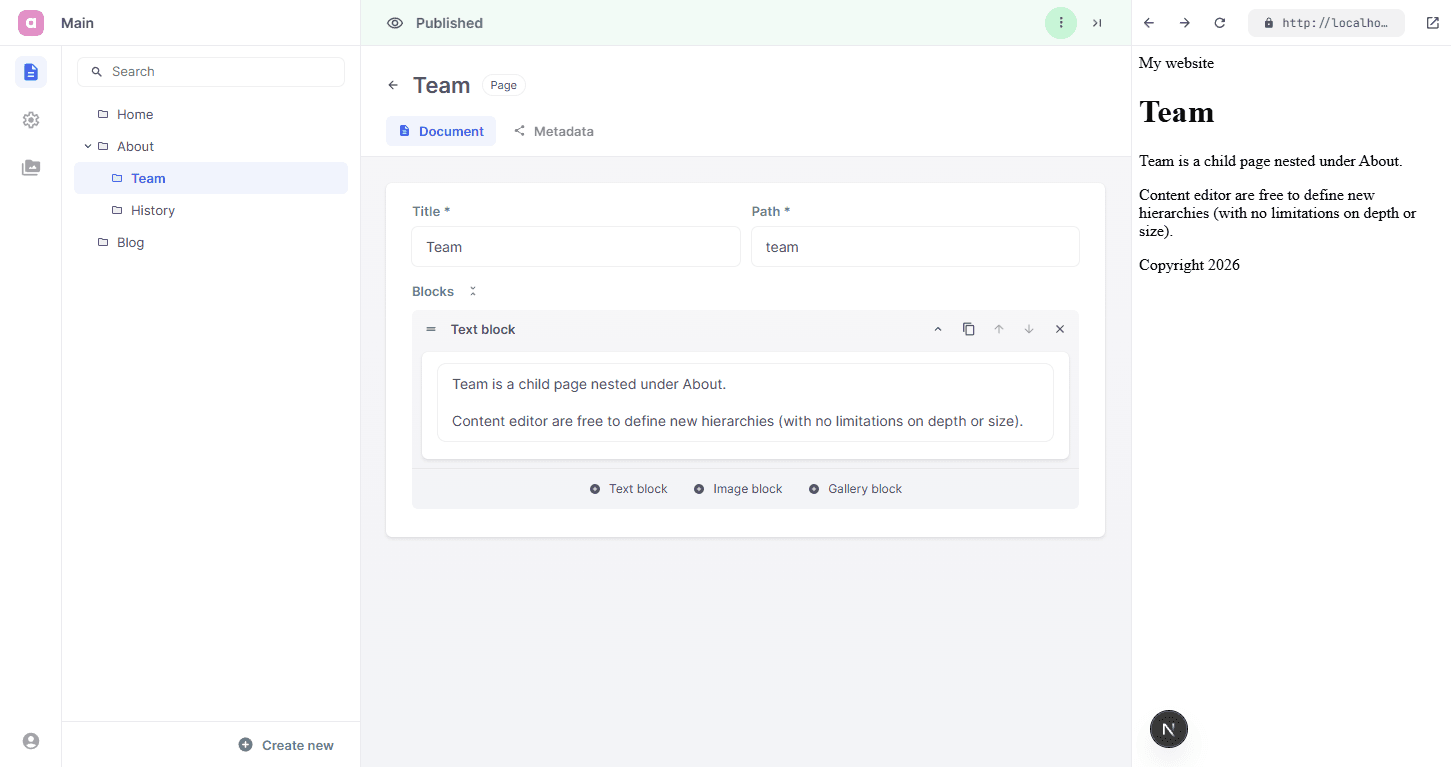
We keep the Blog/Post setup from the previous step and add recursive Page entries for regular pages. We get rid of the current page.tsx routes for the landing page, the blog and invidivual posts and replace them all with one new route.
app/
├ layout.tsx
╰ [[...slug]]/page.tsx

entries/
├ page/
│ ├ Page.tsx
│ ╰ Page.schema.tsx
├ blog/
│ ├ Blog.tsx
│ ╰ Blog.schema.tsx
├ post/
│ ├ Post.tsx
│ ╰ Post.schema.tsx
╰ settings/
  ├ SiteLayout.tsx
  ╰ SiteLayout.schema.tsx

blocks/
╰ ...

cms.tsx
Define a recursive Page entry type so editors can freely nest regular pages under one another, such as an About page with Team and History underneath it. You can define which page types can be nested by using the contains property.
import {Config, Field} from 'alinea'
import {GalleryBlock} from '@/blocks/gallery/GalleryBlock.schema'
import {ImageBlock} from '@/blocks/image/ImageBlock.schema'
import {TextBlock} from '@/blocks/text/TextBlock.schema'

export const Page = Config.document('Page', {
  contains: ['Page'],
  fields: {
    title: Field.text('Title', {required: true, width: 0.5}),
    path: Field.path('Path', {required: true, width: 0.5}),
    blocks: Field.list('Blocks', {
      schema: {
        TextBlock,
        ImageBlock,
        GalleryBlock
      }
    })
  }
})
Make sure to register this new type in cms.tsx. Regular pages can then be created freely in the Pages tree. We did opt to also go for one shared generateMetadata function, since all pages share the same metadata fields. In a real applications you might want to define different logic per page type, do define custom fallback metadata depending on the type of page.
import {Blog} from '@/entries/blog/Blog.schema'
import {Page} from '@/entries/page/Page.schema'
import {Post} from '@/entries/post/Post.schema'
import {SiteLayout} from '@/entries/settings/SiteLayout.schema'

export const cms = createCMS({
  schema: {
    Page,
    SiteLayout,
    Blog,
    Post
  },
  workspaces: {
    main: Config.workspace('Main', {
      roots: {
        pages: Config.root('Pages', {
          contains: ['Page', 'Blog'],
          children: {
            blog: Config.page({
              type: Blog,
              fields: {title: 'Blog', path: 'blog', intro: 'Latest posts'}
            })
          }
        }),
        settings: Config.root('Settings', {
          contains: ['SiteLayout']
        })
      }
    })
  }
})
Use a catch-all route that resolves the URL from slug segments and branches on page._type. Page rendering stay inside their own server components, which nicely isolates functionality per page type. This one route replaces app/page.tsx, app/blog/page.tsx, and app/blog/[slug]/page.tsx.
import type {Infer} from 'alinea'
import {Entry} from 'alinea/core/Entry'
import type {Metadata} from 'next'
import {notFound} from 'next/navigation'
import {cms} from '@/cms'
import {BlogView} from '@/entries/blog/Blog'
import {PageView} from '@/entries/page/Page'
import {Page} from '@/entries/page/Page.schema'
import {PostView} from '@/entries/post/Post'

interface RouteProps {
  params: Promise<{slug?: Array<string>}>
}

export async function generateStaticParams() {
  const urls = await cms.find({
    root: cms.workspaces.main.pages,
    select: Entry.url
  })

  return urls.map(url => ({slug: url === '/' ? [] : url.slice(1).split('/')}))
}

export async function generateMetadata({
  params
}: RouteProps): Promise<Metadata> {
  const {slug = []} = await params
  const url = slug.length > 0 ? `/${slug.join('/')}` : '/'
  const page = await cms.get({
    url,
    include: {
      title: Entry.title,
      metadata: Page.metadata // We will introduce Entry.metadata shortly, for now use Page or any other document type
    }
  })
  if (!page) return {}

  return {
    title: page.metadata?.title || page.title,
    description: page.metadata?.description,
    openGraph: {
      title:
        page.metadata?.openGraph?.title || page.metadata?.title || page.title,
      description:
        page.metadata?.openGraph?.description || page.metadata?.description,
      images: page.metadata?.openGraph?.image
        ? [page.metadata.openGraph.image.src]
        : undefined
    }
  }
}

export default async function CatchAllPage({params}: RouteProps) {
  const {slug = []} = await params
  const url = slug.length > 0 ? `/${slug.join('/')}` : '/'
  const page = await cms.get({url})

  if (!page) notFound()

  if (page._type === 'Blog') {
    return <BlogView />
  }

  if (page._type === 'Post') {
    const postSlug = slug[slug.length - 1]
    if (!postSlug) notFound()
    return <PostView slug={postSlug} />
  }

  const regularPage = await cms.get({url, type: Page})
  if (!regularPage) notFound()
  return <PageView page={regularPage} />
}
Upon completion of these steps, your website should be extended with these features:
A single catch-all route resolves all page URLs in the Pages root, including nested regular pages.
Regular pages are modeled with recursive Page entries, for example an "About"-page with Team and History underneath it.
The Blog/Post flow from step 4 still works, including post navigation and the back-to-blog CTA.
It's worth mentioning that a catch-all route is not always the preferred way of working. It improves the flexibility of your website but it makes it impossible for Next.js to have a per-page javascript-bundle, so it might make the initial page loads of your website a bit heavier. Go for the solution that best fits your specific needs.