Step 2: Content blocks
Websites are often build up with a variety of full-width "page blocks". Content editors can freely manage these building blocks and mix-and-match them to create compelling web content in a curated environment.
We will expand our simple landing page and allow content editors to build up content with text blocks, image blocks and a configurable weather block. Alinea has a list-field which can be used to model this.
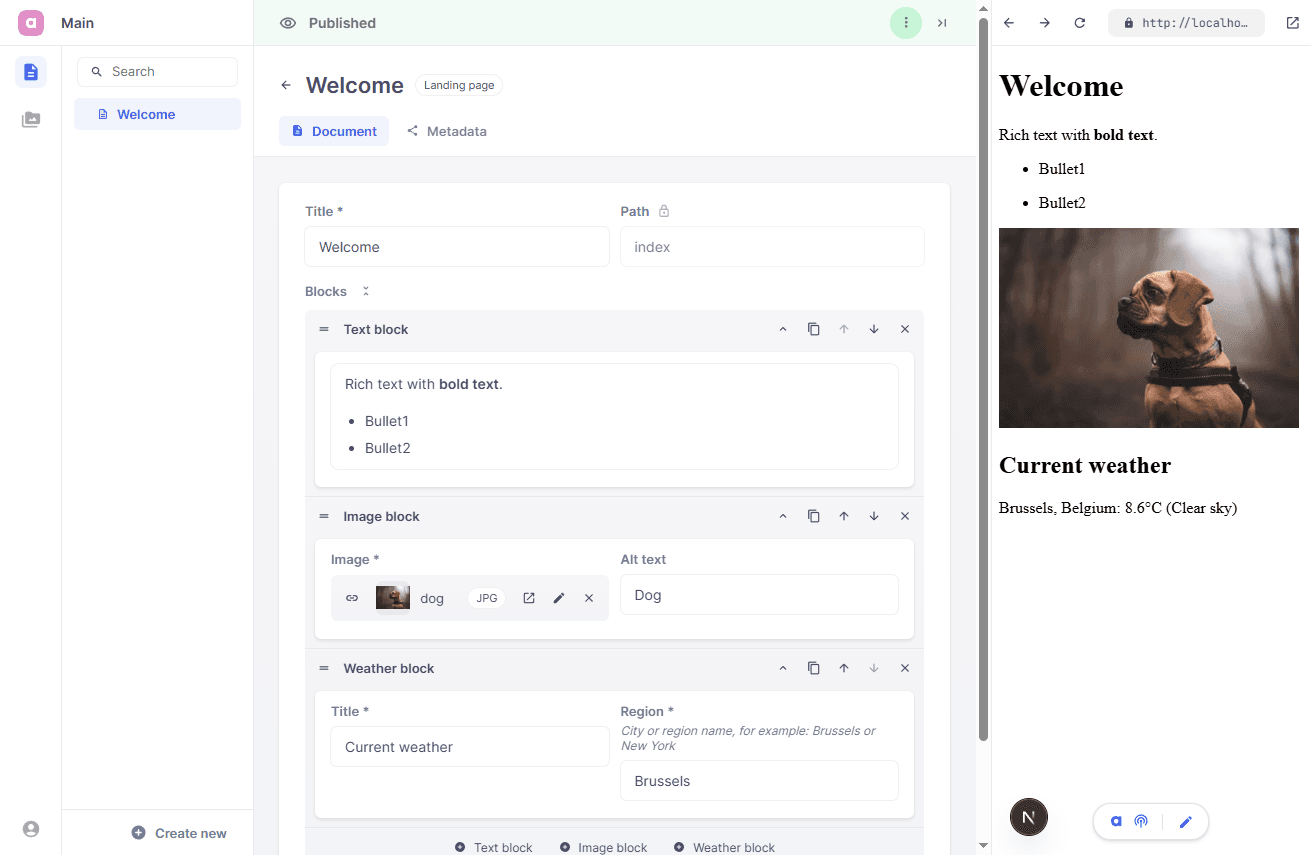
Just like for pages, we recommend using a single component and schema file for every block type. Blocks
app/
╰ page.tsx
╰ layout.tsx

entries/
╰ landing/
  ├ LandingPage.tsx
  ╰ LandingPage.schema.tsx

blocks/
├ text/
│ ├ TextBlock.tsx
│ ╰ TextBlock.schema.tsx
├ image/
│ ├ ImageBlock.tsx
│ ╰ ImageBlock.schema.tsx
╰ weather/
  ├ WeatherBlock.tsx
  ╰ WeatherBlock.schema.tsx

cms.tsx
Create each block type as a schema and a matching view component. The text block is composed of a single rich text field, which we mark as inline to reduce noise for content editors.
import {Config, Field} from 'alinea'

export const TextBlock = Config.type('Text block', {
  fields: {
    body: Field.richText('Text', {inline: true})
  }
})
Alinea exposes a RichText component, which can be used to wrap rich text data and turn it into safely rendered HTML-output. The component allows for easy extending and styling of html components and even full-customizable, nested blocks.
import type {Infer} from 'alinea'
import {RichText} from 'alinea/ui'
import NextLink from 'next/link'
import type {TextBlock} from './TextBlock.schema'

type TextBlockData = Infer.ListItem<typeof TextBlock>

function Link({href, ...props}: {href?: string; [key: string]: any}) {
  if (!href) return <a {...props} />
  return <NextLink href={href!} {...props} />
}

export function TextBlockView({block}: {block: TextBlockData}) {
  return <RichText doc={block.body} a={Link} />
}
The ImageBlock fields are quite straightforward.
import {Config, Field} from 'alinea'

export const ImageBlock = Config.type('Image block', {
  fields: {
    image: Field.image('Image', {required: true, width: 0.5}),
    alt: Field.text('Alt text', {width: 0.5})
  }
})
We use the nextjs Image component to render the image, which will make sure the image is cropped and optimized.
import type {Infer} from 'alinea'
import Image from 'next/image'
import type {ImageBlock} from './ImageBlock.schema'

type ImageBlockData = Infer.ListItem<typeof ImageBlock>

export function ImageBlockView({block}: {block: ImageBlockData}) {
  if (!block.image) return null

  const {src, width, height} = block.image
  return (
    <Image
      src={src}
      width={width}
      height={height}
      alt={block.alt || ''}
      style={{width: '300px', height: 'auto'}}
    />
  )
}
Finally we define a WeatherBlock. Content editors can define a region, from which the geo location will be determined and the weather forecast predicted.
import {Config, Field} from 'alinea'

export const WeatherBlock = Config.type('Weather block', {
  fields: {
    title: Field.text('Title', {required: true, width: 0.5}),
    region: Field.text('Region', {
      required: true,
      width: 0.5,
      help: 'City or region name, for example: Brussels or New York'
    })
  }
})
The WeatherBlock is implemented as a cached, server component. The component is fully responsible for fetching the data it requires. Data is cached for a maximum of 15 minutes.
import {Infer} from 'alinea'
import {unstable_cacheLife as cacheLife} from 'next/cache'
import {WeatherBlock} from './WeatherBlock.schema'
type WeatherBlockData = Infer.ListItem<typeof WeatherBlock>
const weatherCodeLabels = {
0: 'Clear sky',
1: 'Mainly clear',
...,
95: 'Thunderstorm'
}
async function getCurrentWeather(region: string) {
'use cache'
cacheLife({stale: 900, revalidate: 900, expire: 900})
const geocoding = await fetch(
'https://geocoding-api.open-meteo.com/v1/search?name=' + encodeURIComponent(region) + '&count=1'
)
if (!geocoding.ok) return null
const result = (await geocoding.json()).results?.[0]
if (!result) return null
const forecast = await fetch(
'https://api.open-meteo.com/v1/forecast?latitude=' +
result.latitude +
'&longitude=' +
result.longitude +
'¤t=temperature_2m,weather_code&timezone=auto'
)
if (!forecast.ok) return null
const current = (await forecast.json()).current
if (!current) return null
return {
location: result.country ? result.name + ', ' + result.country : result.name,
temperature: current.temperature_2m,
summary: weatherCodeLabels[current.weather_code] ?? 'Current weather'
}
}
export async function WeatherBlockView({block}: {block: WeatherBlockData}) {
const weather = await getCurrentWeather(block.region)
if(!weather) return null
return <p>{block.title}: {weather.location}, {weather.temperature}°C ({weather.summary})</p>
}Extend the landing schema by adding a blocks list that references those block schemas.
import {Config, Field} from 'alinea'
import {ImageBlock} from '@/blocks/image/ImageBlock.schema'
import {TextBlock} from '@/blocks/text/TextBlock.schema'
import {WeatherBlock} from '@/blocks/weather/WeatherBlock.schema'

export const LandingPage = Config.document('Landing page', {
  fields: {
    title: Field.text('Title', {required: true, width: 0.5}),
    path: Field.path('Path', {readOnly: true, width: 0.5, initialValue: ''}),
    blocks: Field.list('Blocks', {
      schema: {
        TextBlock,
        ImageBlock,
        WeatherBlock
      }
    })
  }
})
Update the step landing page view from the previous step. Keep it as a server component that fetches the page and generates metadata, then render each block variant based on _type. We also illustrate how to generate a fall-back metadata description.
import type {TextDoc} from 'alinea'
import {Node} from 'alinea/core/TextDoc'
import type {Metadata} from 'next'
import {notFound} from 'next/navigation'
import {ImageBlockView} from '@/blocks/image/ImageBlock'
import {TextBlockView} from '@/blocks/text/TextBlock'
import {WeatherBlockView} from '@/blocks/weather/WeatherBlock'
import {cms} from '@/cms'
import {LandingPage} from './LandingPage.schema'

export async function LandingPageView() {
  const page = await cms.get({url: '/', type: LandingPage})
  if (!page) notFound()

  return (
    <main>
      <h1>{page.title}</h1>
      {page.blocks.map(block => {
        if (block._type === 'TextBlock') return <TextBlockView key={block._id} block={block} />
        if (block._type === 'ImageBlock') return <ImageBlockView key={block._id} block={block} />
        if (block._type === 'WeatherBlock') return <WeatherBlockView key={block._id} block={block} />
        return null
      })}
    </main>
  )
}

export async function generateMetadata(): Promise<Metadata> {
  const page = await cms.get({url: '/', type: LandingPage})
  if (!page) return {}

  let fallbackDescription = ''
  for (const block of page.blocks) {
    if (block._type === 'TextBlock') {
      fallbackDescription = plainText(block.body)
      break
    }
  }

  return {
    title: page.metadata.title || page.title,
    description: page.metadata?.description || fallbackDescription,
    openGraph: {
      title: page.metadata.openGraph.title || page.metadata.title || page.title,
      description: page.metadata.openGraph.description || page.metadata?.description,
      images: page.metadata?.openGraph.image
        ? [page.metadata?.openGraph.image.src]
        : undefined
    }
  }
}

export function plainText(value: TextDoc<any> | string | undefined): string {
  if (!value) return ''
  if (typeof value === 'string') return value

  if (!Array.isArray(value)) return ''
  const result = value
    .reduce((acc, node) => {
      return acc + textOf(node)
    }, '')
    .trim()
  return result.replace(/ +(?= )/g, '')
}

function textOf(node: Node): string {
  if (node._type === 'hardBreak') return '\n'
  if (Node.isText(node)) {
    return node.text ? ' ' + node.text : ''
  } else if (Node.isElement(node) && node.content) {
    return node.content.reduce((acc, node) => {
      return acc + textOf(node)
    }, '')
  }
  return ''
}
Upon completion of these steps, your landing page should be extended with these features:
A system of content blocks which can be rearranged at will.
An example of a rendered, rich text field.
An example of a more complex block, which fetches data from an external API.
Metadata fallback: content of the first text block is used as fallback description.