Step 1: Landing page
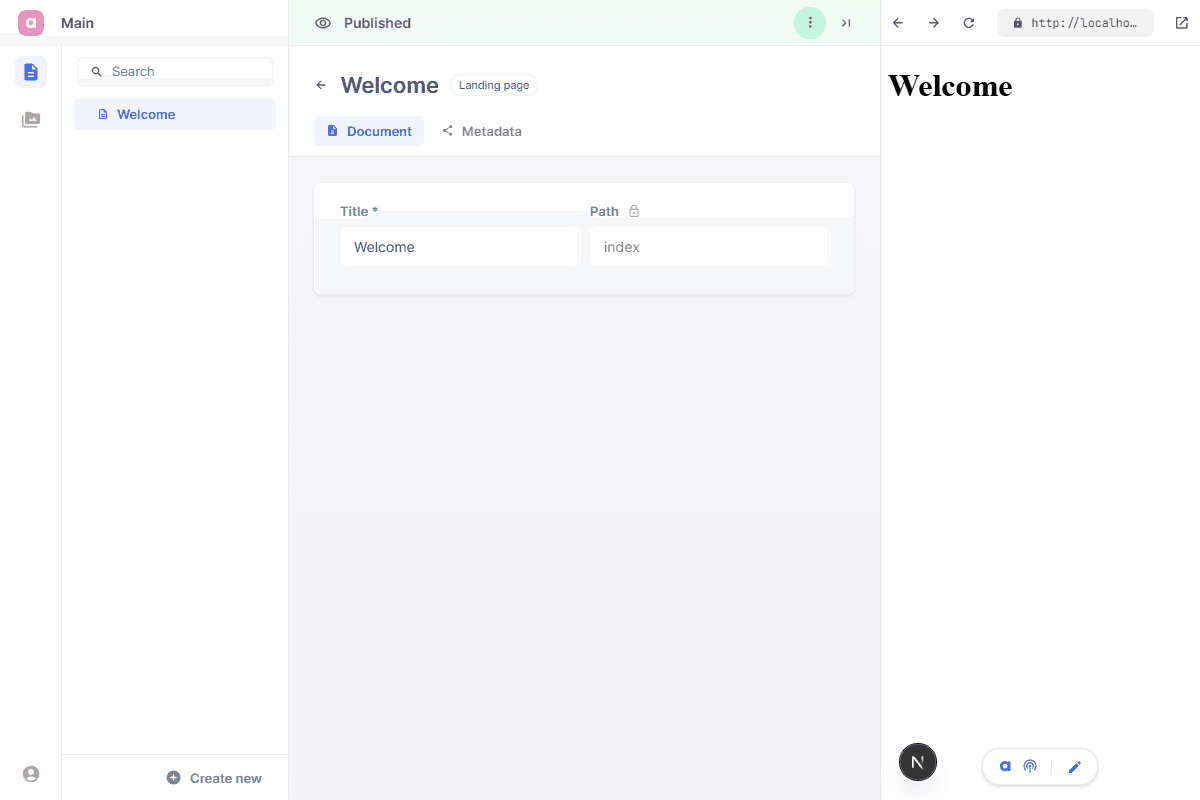
We're going to work towards setting up a welcome page, served on the root domain of the website. This page will simply print the title of the page, which can be adjusted in the CMS.
We recommend creating a single component file for every page. In this case we call it LandingPage.tsx. This React component will be accompagnied by a schema file, which defines the fields of this page.
app/
╰ page.tsx
╰ layout.tsx

entries/
╰ landing/
  ├ LandingPage.tsx
  ╰ LandingPage.schema.tsx

cms.tsx
We start by defining the landing entry schema in its own file. Its path is fixed to an empty string and made read only so it always resolves to /.
import {Config, Field} from 'alinea'

export const LandingPage = Config.document('Landing page', {
  fields: {
    title: Field.text('Title', {required: true, width: 0.5}),
    path: Field.path('Path', {readOnly: true, width: 0.5, initialValue: ''})
  }
})
Then we set up the Page-component itself. We define this as a server component and make it responsible for fetching the required data from the CMS. Notice we defined the LandingPage schema as a document, which means it automatically receives various metadata fields. We fetch this from the CMS to properly implement a generateMetadata function.
import type {Metadata} from 'next'
import {notFound} from 'next/navigation'
import {cms} from '@/cms'
import {LandingPage} from './LandingPage.schema'

export async function LandingPageView() {
  const page = await cms.get({url: '/', type: LandingPage})
  if (!page) notFound()

  return (
    <main>
      <h1>{page.title}</h1>
    </main>
  )
}

export async function generateMetadata(): Promise<Metadata> {
  const page = await cms.get({url: '/', type: LandingPage})
  if (!page) return {}

  return {
    title: page.metadata.title || page.title,
    description: page.metadata?.description,
    openGraph: {
      title: page.metadata.openGraph.title || page.metadata.title || page.title,
      description: page.metadata.openGraph.description || page.metadata?.description,
      images: page.metadata?.openGraph.image
        ? [page.metadata?.openGraph.image.src]
        : undefined
    }
  }
}
Register the landing schema in the cms.tsx and (optionally) seed the initial homepage entry.
import {Config} from 'alinea'
import {createCMS} from 'alinea/next'
import {LandingPage} from '@/entries/landing/LandingPage.schema'

export const cms = createCMS({
  schema: {LandingPage},
  workspaces: {
    main: Config.workspace('Main', {
      source: 'content',
      mediaDir: 'public',
      roots: {
        pages: Config.root('Pages', {
          contains: ['LandingPage'],
          children: {
            // Optionally seed this page, alternatively you can simply create the page from the CMS directly
            index: Config.page({
              type: LandingPage,
              fields: {
                title: 'Welcome',
                path: ''
              }
            })
          }
        }),
        media: Config.media()
      }
    })
  },
  baseUrl: {
    development: 'http://localhost:3000'
  },
  handlerUrl: '/api/cms',
  dashboardFile: 'admin.html',
  preview: true
})
Finally, we implement the page.tsx and layout.tsx files in our app folder to fully wire this site up like a standard Next.js project. Notice we added the previews widget to the root layout, this will activate live previews for content editors.
import {LandingPageView} from '@/entries/landing/LandingPage'

export {generateMetadata} from '@/entries/landing/LandingPage'

export default function Page() {
  return <LandingPageView />
}
import type {Metadata} from 'next'
import {cms} from '@/cms'

export default function RootLayout({children}: {children: React.ReactNode}) {
  return (
    <html lang="en">
      <body>
        {children}
        <cms.previews widget />
      </body>
    </html>
  )
}
Upon completion of these steps, you should have a minimal working website with these verifiable features:
Upon starting your CMS, a single page entry representing your landing page is present.
Live previews are enabled, when editing the title of your landing page the previewed page should reflect these any changes.
Wired up metadata: try navigating to the metadata tab and adjusting any of the content.